
A marketing automation problem can look like a software problem even when the software is not the real constraint.
The team may already have a CRM, email platform, form builder, scheduling tool, texting capability, and reporting dashboard. Inquiries still wait too long. Follow-up depends on somebody remembering. Contact records are incomplete. Customers receive the wrong message. Nobody trusts the pipeline report.
Buying another platform adds features. It does not automatically decide what should happen, who owns each handoff, which data is required, where a person should intervene, or how the team will know the workflow is working.
That is the decision a growing business needs to make: do we need better software, a marketing automation consultant, or clearer ownership of tools we already have?
The short answer
Software may be enough when:
- the workflow is already clear and documented
- one internal owner understands the customer journey and the platform
- the required data is reliable
- the systems already connect cleanly
- the team has time to build, test, monitor, and improve the automation
A marketing automation consultant is more useful when:
- the process crosses several tools or teams
- nobody can agree on what should happen after an inquiry
- the CRM contains inconsistent or missing data
- workflows were built but are not trusted
- reporting does not connect marketing activity to real sales outcomes
- the team needs implementation, testing, training, and ongoing optimization, not just a software recommendation
In some cases the right answer is neither. The business may need to simplify the process before automating it.
What does a marketing automation consultant actually do?
A useful marketing automation consultant translates a business process into a dependable system.
That work can include:
- mapping the current customer and sales journey
- identifying slow responses, duplicated work, unclear handoffs, and missing data
- defining triggers, conditions, timing, owners, and stop rules
- configuring CRM stages, custom fields, tags, forms, calendars, email, and text messages
- connecting the website, advertising, call tracking, scheduling, and sales tools
- testing real messages and edge cases before launch
- building reports that connect activity to conversations, opportunities, and revenue
- training the people who will use and maintain the system
- reviewing performance and refining the workflow after real customers move through it
The best consultant does not automate every task that can be automated. The goal is to make the customer experience faster and more consistent while preserving human judgment where it matters.
Why software alone often disappoints
Software demos usually begin with a clean contact record and a clear process. Real businesses rarely do.
One salesperson uses the pipeline. Another keeps notes in email. Website forms label the same service three different ways. Phone inquiries never create a record. Old contacts share an inbox with active opportunities. Nobody defined when an estimate becomes lost or which messages should stop when a person replies.
Automation magnifies those decisions. If the inputs and rules are unclear, the system can send faster confusion.
Before selecting a platform, answer five questions:
- What event starts the workflow?
- What information must be present before the next step?
- Who owns the contact at each stage?
- What action should stop or change the automation?
- What business outcome will prove the workflow helped?
If the team cannot answer those questions, the first deliverable should be a process map, not a software contract.
When your existing tools may be enough
Do not replace a workable system because another platform has a longer feature list.
Your existing tools may be sufficient if the business needs one bounded improvement, such as:
- an immediate confirmation after a website form submission
- appointment reminders from an existing calendar
- a short estimate follow-up sequence
- a review request after a completed job
- a simple reactivation campaign for a clean contact segment
The internal owner should still test message formatting, sender identity, reply handling, suppression rules, time zones, mobile rendering, duplicate prevention, and what happens when the data is incomplete.
The article on marketing tools that actually save time can help separate a useful capability from another disconnected subscription.
When a marketing automation consultant earns their place
Outside help becomes more valuable when the system must coordinate several moving parts.
The workflow crosses marketing and sales
A form submission is a marketing event until somebody must qualify, call, schedule, estimate, or close the opportunity. If those responsibilities are split across teams, automation needs explicit ownership and handoff rules.
Several systems contain different versions of the truth
The website, CRM, inbox, scheduling tool, payment system, and reporting platform may all store part of the customer record. A consultant can identify which system should own each field and how information should move without creating duplicates or overwriting useful history.
The team does not trust its current automations
Workflows sometimes keep running long after the person who built them leaves. The team may be afraid to change them because nobody knows which contacts, triggers, or messages they affect.
An audit should inventory the active workflows, owners, entry conditions, exits, dependencies, messages, and results before anything is rebuilt.
The business needs an operating system, not one campaign
A single email sequence is a project. A connected system for inquiries, appointments, estimates, reviews, reactivation, and reporting needs architecture, governance, and ongoing care.
MassMonopoly’s managed Growth Hub is built around that connected operating need rather than treating the CRM as a software license the client must figure out alone.
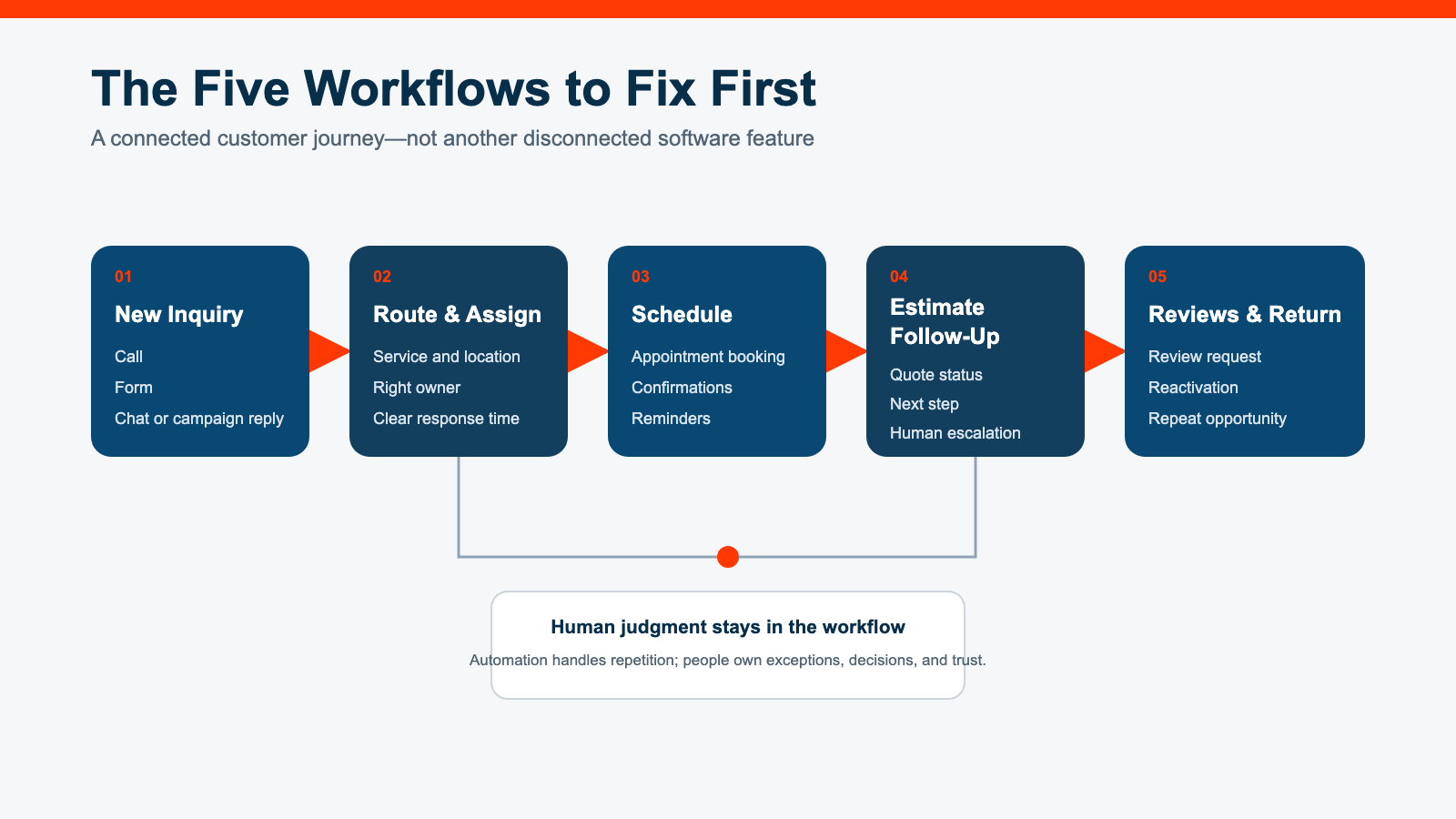
The five workflows to fix first
The highest-value starting point is usually close to a real customer action.
1. New inquiry response and routing
Every phone call, form, chat, and campaign response should reach the right owner quickly. The contact should receive a useful confirmation that sets expectations without pretending a human has replied when one has not.
Routing rules should account for service, location, availability, customer type, and any qualification detail the team actually uses.
2. Appointment scheduling and reminders
Automated confirmations and reminders can reduce avoidable back-and-forth. They should include the time, location or meeting link, preparation steps, rescheduling path, and a real way to reach the team.
3. Estimate, proposal, or consultation follow-up
Silence after a proposal does not always mean no. A useful sequence reminds the prospect, answers common questions, and prompts the responsible person to intervene before the opportunity goes cold.
The timing and tone should match the sale. A five-figure project should not receive the same generic cadence as an online purchase.
4. Customer review requests
The workflow should ask at an appropriate point after a successful outcome, send people to the correct review destination, record whether the request was sent, and avoid repeatedly asking the same customer.
5. Reactivation and long-term nurture
Past customers, quiet estimates, and qualified prospects may be valuable when the message reflects the relationship and current need. Segmentation matters. A broad “checking in” blast is not a strategy.
The article on missed calls and slow follow-up explains why the first response and next step should be fixed before the business buys more demand.
What not to automate first
Delay automation when:
- the underlying process changes every week
- the contact data is too incomplete to route safely
- the team has not approved the sender, message, timing, or stop rules
- the workflow touches sensitive customer situations that need human judgment
- the business cannot identify an owner for exceptions
- a manual version has never been tested successfully
Also avoid beginning with a long, complex nurture sequence simply because the platform offers one. Start with a short workflow tied to a clear event, prove it works, and expand from evidence.
Consultant, agency, implementer, or internal owner?
The label matters less than the scope and accountability.
A platform implementer
Best when the process is already defined and the team needs technical configuration inside a specific product.
A marketing automation consultant
Best when the business needs process mapping, tool selection or rationalization, workflow architecture, implementation guidance, and a measurement plan.
A managed marketing and automation team
Best when strategy, content, campaigns, CRM operations, reporting, and ongoing optimization must stay coordinated without adding several internal hires.
MassMonopoly’s on-demand marketing team combines senior strategy and execution across those layers. The comparison of agency, in-house, and on-demand marketing models can help determine which ownership structure fits.
An internal owner
Best when the company has enough ongoing volume and complexity to justify dedicated operational expertise, plus the authority to enforce process across departments.
Hybrid models are common. A consultant may design and implement the first system, then train an internal owner. A managed team may operate the system while leadership owns business rules and approvals.
Questions to ask before hiring a marketing automation consultant
Ask candidates:
- How will you learn and document our current process before recommending tools?
- How do you decide what should remain manual?
- What data must be cleaned before implementation?
- How will you prevent duplicate contacts, duplicate messages, and conflicting workflows?
- How do replies, opt-outs, bounced messages, and exceptions stop or change the automation?
- Who will own the system after launch?
- What training and documentation are included?
- How will you test the real sender identity and inbox or phone experience?
- Which metrics will connect the workflow to qualified conversations or revenue?
- What will be reviewed thirty and ninety days after launch?
Be cautious if the answer begins and ends with a preferred platform. Tool expertise matters, but the consultant should be able to explain the business process the tool will support.
A practical first 30 days
Week 1: inventory and evidence
- list the active tools, workflows, forms, calendars, inboxes, and integrations
- identify owners and current manual workarounds
- review recent inquiries from first contact through outcome
- document data gaps, duplicate records, and messages nobody trusts
Week 2: choose one workflow
- select a high-value, bounded customer event
- define the trigger, required data, owner, timing, stop rules, exceptions, and success metric
- remove unnecessary steps before automating
Week 3: build and test
- configure the workflow in a safe test state
- test complete, incomplete, duplicate, replied, opted-out, and after-hours scenarios
- verify sender identity and the actual delivered experience on desktop and mobile
- confirm a human can see and handle exceptions
Week 4: controlled launch and review
- launch to a limited real segment
- monitor responses, errors, and handoffs closely
- compare the results with the previous manual process
- fix defects before expanding volume or adding another workflow
The simple marketing funnel for growing businesses provides a useful high-level model, but the automation should reflect the actual path customers take in your business.
How to measure whether the work helped
Useful measures include:
- response time to new inquiries
- percentage of inquiries assigned to an owner
- appointment booking and show rate
- estimate or proposal follow-up completion
- reply and opt-out rates by workflow
- qualified opportunities created
- time saved on repeatable manual tasks
- customer reviews requested and completed
- opportunities reactivated
- records with complete, trusted source and stage data
Do not treat “workflow active” as a business result. A system can run exactly as configured and still send the wrong message, create busywork, or fail to improve the customer path.
The bottom line
Hire a marketing automation consultant when the problem involves process, ownership, data, integration, testing, and ongoing improvement across several tools or teams.
Use the software you already have when the workflow is clear, the data is dependable, and an internal owner can build and maintain one bounded improvement safely.
Simplify first when nobody can explain what should happen after a customer acts.
MassMonopoly can help map the workflow, connect the right tools, and operate a managed Growth Hub so automation supports a faster, clearer customer experience instead of adding another layer the team has to babysit.