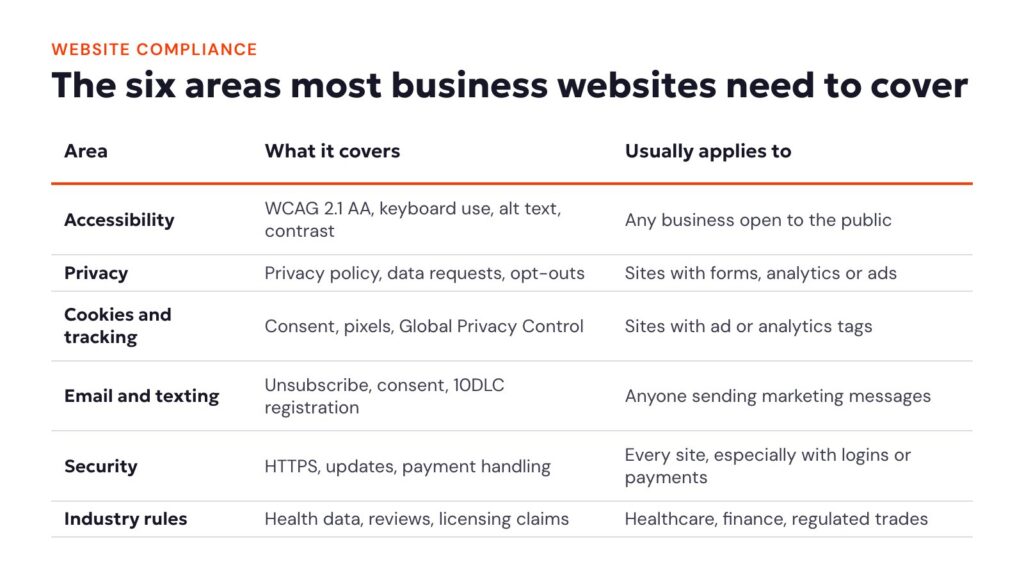
Short answer: website compliance means your site follows the laws and standards that apply to it. For most US businesses that covers six areas: accessibility, privacy, cookies and tracking, email and text marketing, security, and any rules specific to your industry. None of it requires a law degree, but each area needs an owner and a regular check.
Most businesses only think about compliance when a demand letter or a complaint arrives. By then the fix is more expensive and more stressful. Here’s what each area involves, what usually goes wrong and a checklist you can work through this month.
This is general information to help you ask the right questions, not legal advice. For decisions about your specific obligations, talk to your attorney.
1. Accessibility
An accessible website can be used by people with disabilities, including people who use screen readers, keyboard navigation or magnification. In the US, the Department of Justice has said the Americans with Disabilities Act applies to the websites of businesses open to the public, and accessibility demand letters and lawsuits are common.
The standard most organizations work to is the Web Content Accessibility Guidelines (WCAG) at level AA, usually version 2.1 or the newer 2.2. In practice that means:
- Every image that carries meaning has alt text describing it.
- Text has enough contrast against its background.
- Menus, forms and buttons work with a keyboard alone.
- Headings are in a logical order, and links say where they go.
- Videos have captions, and forms have labels and clear error messages.
Be wary of accessibility overlays that promise instant compliance with one line of code. They can add useful controls, such as text size and contrast, but they don’t fix the underlying content and code, and in 2025 the FTC took action against an overlay vendor over claims that its tool made websites compliant. Real progress comes from testing and fixing the site itself. Our website accessibility and ADA compliance service combines automated scans with manual testing, then repairs what it finds.
2. Privacy
If your website collects personal information through forms, analytics, chat or ads, you need a privacy policy that accurately describes what you collect, why and who you share it with. A growing number of states, including California, Colorado, Virginia and Texas, have comprehensive privacy laws that give residents the right to see, delete or opt out of the sale or sharing of their data. Thresholds vary, so check which laws apply to a business of your size.
The most common problem isn’t a missing policy. It’s a policy that no longer matches the site: new chat tools, ad pixels or CRM integrations added since it was written. Review it whenever you add a tool.
Massachusetts businesses should also know the state’s data security regulation, 201 CMR 17.00, which requires a written information security program for anyone who holds personal information about Massachusetts residents.
3. Cookies and tracking
Analytics tags, ad pixels and session recording tools set cookies and send data to third parties. Depending on where your visitors are, you may need to get consent first (as in the EU and UK) or offer a clear way to opt out (as in several US states, some of which also require honoring the browser-level Global Privacy Control signal).
- Inventory every tag on the site, including ones added by plugins and agencies.
- Use a consent tool that actually blocks tags until consent where it’s required.
- Make sure your privacy policy and cookie banner describe the same tools.
4. Email and text marketing
Your website forms are often where marketing consent starts. For email, the CAN-SPAM Act requires a working unsubscribe link, honest subject lines and your physical mailing address. For texting, the Telephone Consumer Protection Act (TCPA) requires consent before sending marketing texts, and US carriers require business numbers to be registered for A2P 10DLC messaging.
If a form leads to text messages, such as a missed-call text back or appointment reminders, include clear consent wording next to the phone field and keep a record of when consent was given.
5. Security
- HTTPS everywhere, with a valid certificate and no mixed-content warnings.
- Software kept current: WordPress core, themes and plugins, with unused plugins removed.
- Strong logins: unique admin accounts, two-factor authentication and no shared passwords.
- Payments handled by a PCI-compliant processor, so card details never touch your own server.
- Backups you’ve actually tested restoring.
6. Industry-specific rules
- Healthcare: be careful with tracking pixels and third-party tools on pages where patients enter health information, and make sure vendors that handle protected health information will sign a business associate agreement under HIPAA.
- Reviews and testimonials: the FTC’s rule on consumer reviews, in effect since October 2024, bans fake reviews and buying reviews. Only publish real customer reviews, and disclose any connection with people who endorse you.
- Licensed trades and professions: show license numbers where your state requires them, and make sure claims about guarantees, certifications or credentials are accurate.
- Finance, legal and insurance: these fields have their own advertising and disclosure rules. Check them with your compliance team before launching new pages.
A website compliance checklist
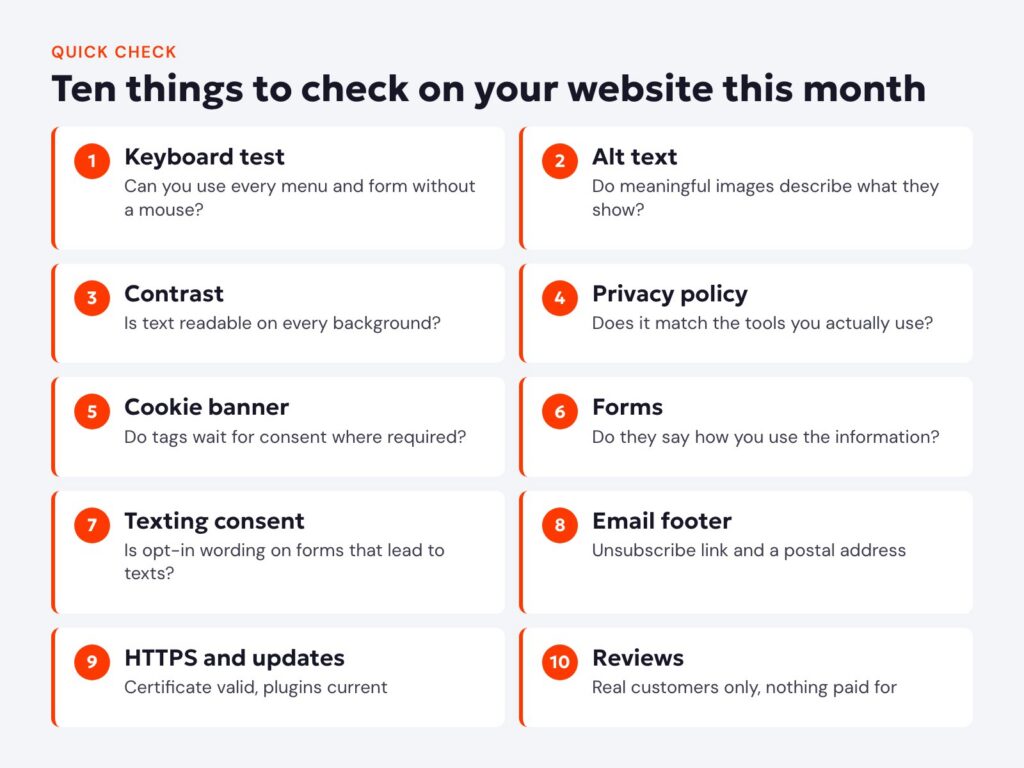
Work through the list once now, then put a quarterly reminder in the calendar. Compliance problems usually creep back in when new tools, pages or campaigns are added, not when nothing changes.
Who should own website compliance?
In most growing businesses, nobody does, and that’s the real risk. Give one person responsibility for the checklist, and make compliance part of every website change: new forms get consent wording, new tools get added to the privacy policy, and new pages get an accessibility check before they go live. If you’re planning a redesign, build these checks into the project from the start. It’s far cheaper than retrofitting them later. See how we approach web design and development.
Not sure where your site stands?
We can test your website for accessibility, review it against the checklist above and fix what we find. See our website accessibility and ADA compliance service.